
The app
The AI companion
An AI that reads your whole book and helps you think — and never writes a sentence of it for you. That refusal is the point, not a limitation.
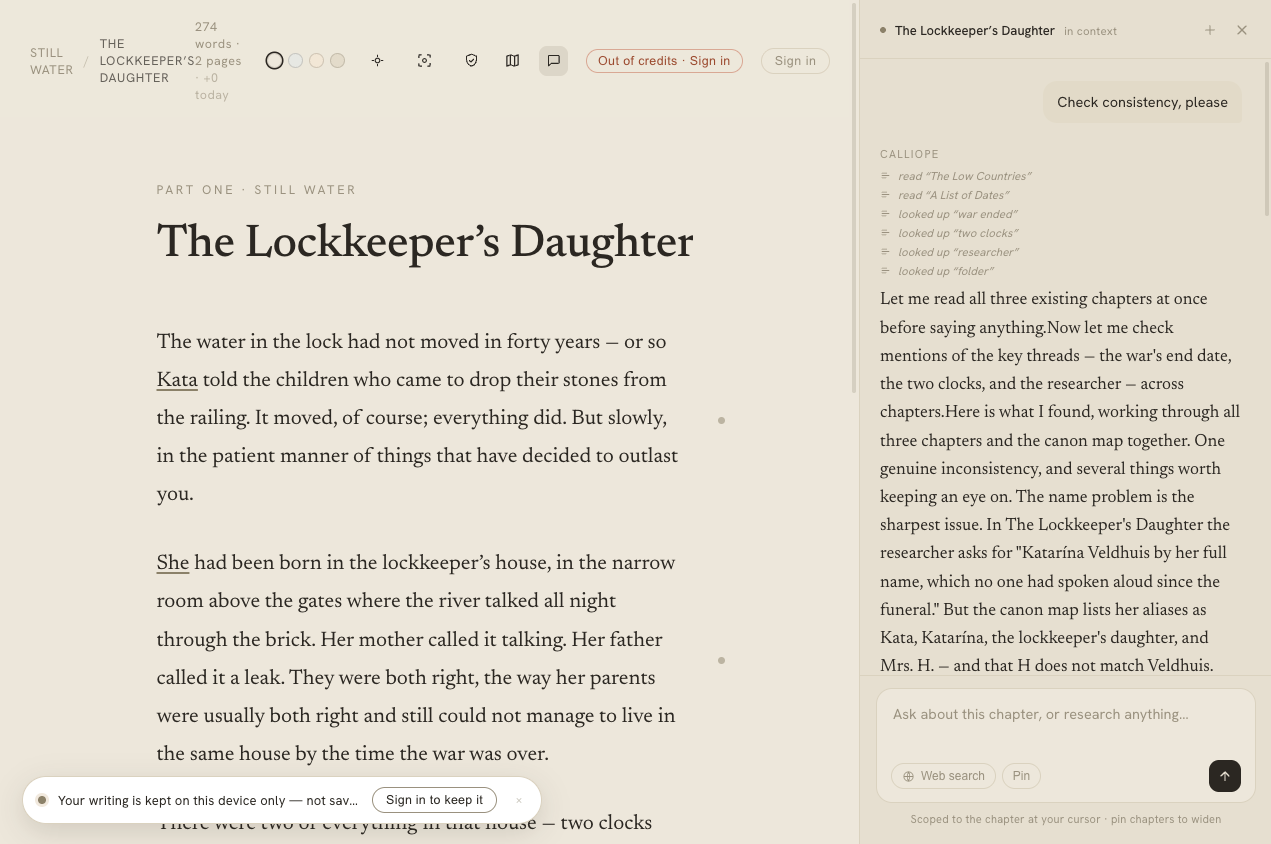
The companion lives in the margin, grounded in your book — and it never writes into the page.
On this page
Calliope has a real AI companion built into the editor. It can read every word you’ve written, reason about your cast, check your consistency, and research the world around your story. The one thing it will not do — ever — is write or edit the prose of your chapter. Everything below is help around the writing; the writing stays yours.
Chat, grounded in your book
The companion lives in the marginalia pane. Ask it something and it answers from your actual book — not a vague impression of it. It reaches into the manuscript on demand with read-only tools: it can pull the full text of any chapter, and find everywhere a character, place, or fact is mentioned. Ask “what did I establish about the locket?” or “quote the line where Zakariah arrives” and it fetches the real text and quotes it, rather than guessing.
It also answers real-world questions in service of your scene — a period detail, a piece of folklore, the plausible logistics of the thing your character is doing — and ties the answer back toward the page rather than wandering into an encyclopaedia. When a question needs the live web, turn on web search at the composer. The companion only steps back from asks with genuinely nothing to do with your book, and even then it points you somewhere useful instead of refusing flat — so the boundary stays predictable: research that helps the writing is welcome.
You’ll see what it’s doing: as it works, faint lines in the pane note “read The Lockkeeper’s Daughter” or “looked up Zakariah”, so a pause reads as work rather than a hang. A Stop button is there the whole time it’s streaming — click it and the run halts immediately, no error, and you’re only charged for what was actually used. Your conversations are saved beside the paragraph they started on.
Book memory
Until you tell it otherwise, every conversation and every AI pass starts from a blank slate — so a correction you made last week (“her eyes are grey”) is forgotten by next session, and the consistency check flags it all over again. Book memory fixes that: a short, per-book set of standing notes the companion carries into every conversation and pass. It only ever remembers what you bless.
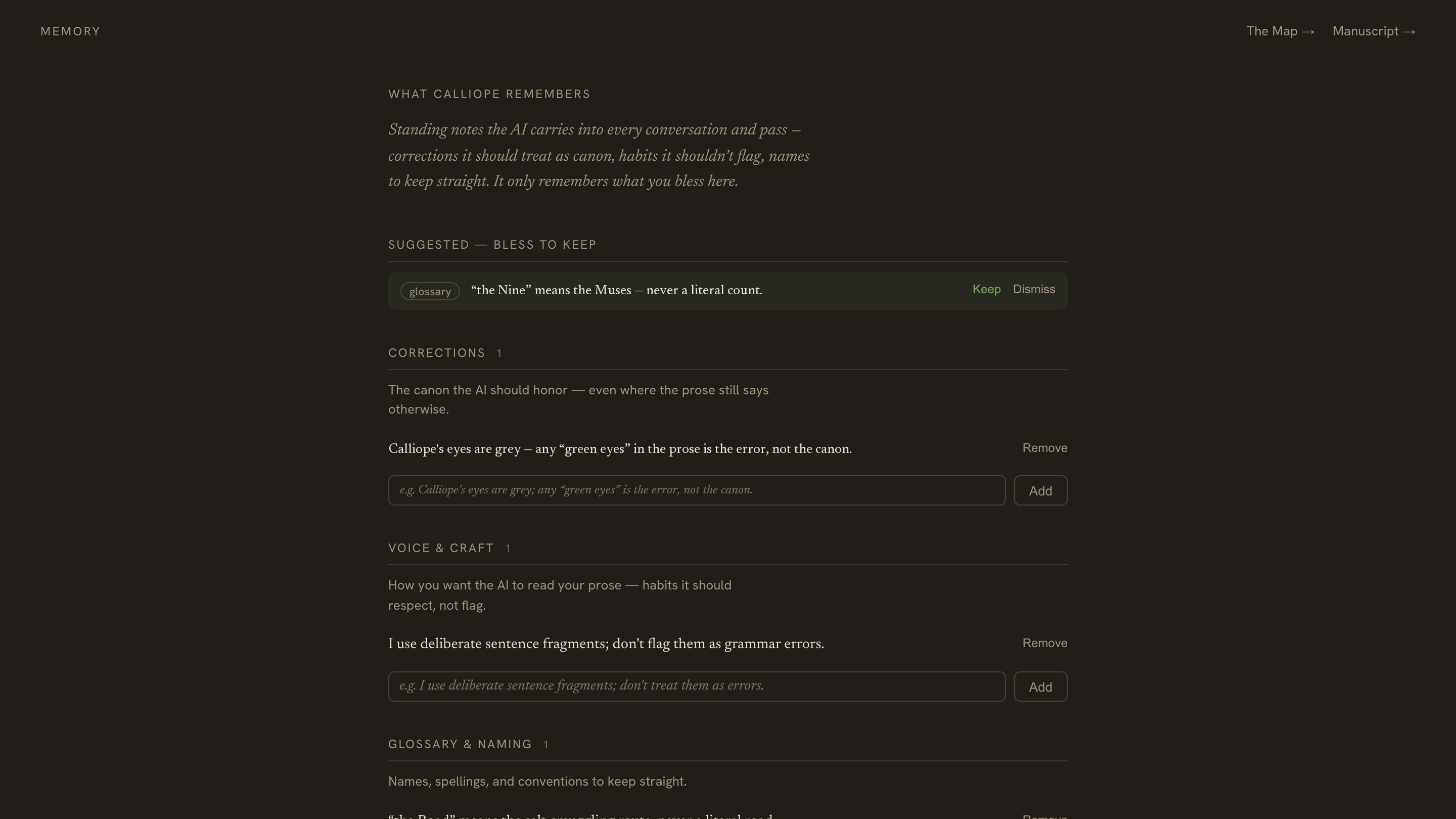
The notes come in three kinds:
- Corrections — the canon to honour, even where the prose still says otherwise (“Calliope’s eyes are grey; any ‘green eyes’ in the text is the error, not the canon.”).
- Voice & craft — habits it should respect rather than flag (“I use deliberate sentence fragments; don’t treat them as errors.”).
- Glossary & naming — names, spellings, and conventions to keep straight (“‘the Road’ means the salt-smuggling route, never a literal road.”).
You add them however you like: write a note directly on the Memory page, or just tell the companion in chat — “remember that…” — and it saves one. It can also suggest notes distilled from a conversation, which wait in a tray until you Keep or Dismiss them; nothing is remembered without your say-so.
Memory has a mirror image, too. Anything you dismiss elsewhere — a detected name you don’t want tracked, a consistency finding you disagree with — stops coming back, and lives in a Dismissed list with one-click Restore if you change your mind. So the companion learns both what to remember and what to stop bringing up.
Book memory travels with the book: it’s read by the in-app companion and by connected tools over MCP and the Writer API. It’s a signed-in feature, since the notes are stored on your account.
Pinning chapters into context
The companion pulls in what it needs on demand — but you can also pin chapters so they’re always in scope for the conversation. Open the pin picker, choose the chapters you want kept in view, and each shows as a chip above the composer; from then on everything you ask is answered with those chapters fully in mind.
For the whole picture at once there’s a Pin whole book toggle at the top of the picker: one click brings the entire manuscript into scope as a single “Whole book” chip, and the per-chapter pins step aside until you switch it back off.
Pinning the whole book is heavier than pinning a chapter or two — the companion reads more with each message. On a very large manuscript it draws in as much as fits and leans on the always-present outline, synopses, and its own lookup for the rest, so nothing breaks; it’s simply a bigger, richer context, and a little more spend per message.
Organising the Map from chat
The companion doesn’t only read your canon — it can change the Map, and its links to your prose, for you when you ask. Tell it what you want in plain language and it makes the edit, confirms in a line — “Renamed Lucasová to Dubois in the Map” — and the Map updates live beside you:
- Rename an entry — “rename Ms Lucasová to Dubois.” It keeps the old name as an alias, so the mentions already in your prose still resolve.
- Merge two entries that are really the same person or place — “merge Lucasová and the waiter’s wife.” One entry survives and absorbs the other’s aliases, attributes, and mentions.
- Add a new one — “add a character called Dubois, Pierre’s wife.”
- Edit an entry’s aliases, summary, or kind.
- Link and unlink mentions — “make sure every mention of Orpheus is linked,” or “remove the connection of ‘She’ to Calliope.”
- Relink a specific word — “this ‘rose’ should link to Rose,” “link ‘orpheus’ to Orpheus.”
- Summarise an entry — “summarise Orpheus” and it drafts the one-line summary for you to keep or edit.
- Find possible mentions — “find possible mentions of Thalia” and it surfaces the spots that slipped through, for you to link.
Two things stay true no matter what you ask:
- It never touches your prose. This is the same hard line as everywhere else — the companion manages the Map and the links between it and your prose, never the words on the page. A rename or a re-link changes the entry and where it points, not the manuscript.
- You’re in command. It treats what you tell it as the truth to make the canon match: if you say a detail is wrong, it corrects it rather than arguing. It’ll still flag a genuine problem it notices — a name collision, a timeline that doesn’t add up — but it raises it once and then does what you asked.
Editing the Map this way needs you to be signed in to your own book, and it’s covered by the same credits as any chat message — no separate charge, and no subscription required.
Consistency checks
Run a consistency check on a chapter and Calliope measures the prose against your Map. Two passes run: a deterministic one that catches name drift — Katarina where your canon says Katarína — and an AI pass that flags prose contradicting an established fact (the Map says grey eyes; this paragraph says green). Findings arrive as quiet margin notes you can jump to and dismiss — never red alarms, never auto-corrected. If the drift was deliberate, wave it off; you decide which is right, the prose or the Map.
To check your whole manuscript in one pass — and catch the contradictions that span chapters, which a single-chapter check can’t see — run Check the whole book from the Structure page.
Detecting your cast
Point the AI at a chapter and it proposes the characters and places it found, resolved against your existing canon, for you to accept or reject. This is the entity detection covered under the Map — proposals only, nothing written without your approval.
Synopsis styles
Ask the companion to draft a chapter synopsis and you can choose how it reads. Nine styles are available — pick the register that suits how you plan:
- Default — a sentence or two of plain prose;
- Short — a single terse line;
- Verne — a chronological list of beats;
- Logline — a one-line industry hook;
- Telegraphic — clipped “cablese”;
- Dramatic question — the chapter’s central question;
- Dramatis personae — who appears and what they want;
- Back-cover — a marketing tease;
- Haiku — 5–7–5, if you’re feeling it.
Set your preferred style once per book and it becomes the default. Generating a synopsis returns text — it doesn’t overwrite the chapter; you decide whether to keep it in the outline.
Card suggestions
From the marginalia pane, Suggest cards has the AI read your current chapter and propose a handful of marginalia worth keeping — notes, to-dos, references — each with a one-line reason. Accept the useful ones, dismiss the rest. It’s the assisted ceiling on marginalia; the manual /note, /todo, /ref floor is always there and always free.
Nudges
Two small, calm encouragements live in the background:
- Writing nudges notice earned moments — your first progress in a session, nearing your day’s goal, crossing a chapter milestone — and surface a brief, auto-fading line. They’re rate-limited and spaced so they never become noise, and every session is guaranteed at least one within your first stretch of real writing. They’re free.
- Threshold nudges meet you at the blank page — the first chapter of an empty book, or of a new part — with a single literary line after you’ve sat a moment. When the chapter already has a synopsis or mapped facts, the nudge offers a concrete way in from what you already know. Once per book, once per part, dismissible, and also free.
What costs credits, and what doesn’t
The AI features that call Calliope’s own models spend credits:
- Chat — the companion, its retrieval, and web search;
- Studio work — synopsis generation, consistency checks, entity detection, and card suggestions.
Free (absorbed by Calliope): the nudges, the deterministic name-drift pass, and the little activity lines that show what the AI is doing.
You stay in control of the spend with the spend governor — two switches, Chat and Studio assistance, both on by default. Turn one off and calls in that category are blocked before any cost is incurred; a call already in flight finishes and settles normally. And every operation is hard-capped by your credit balance before any model is called, so the governor is comfort, not the safety net. See Accounts, credits & billing for the rest.
Under the hood: Calliope routes each kind of work to the model that fits it — deeper reasoning for chat, checks, and synopses; a smaller, faster model for the formulaic bits like nudges and card suggestions. You never pick a model; you just get sensible quality for the cost.